

Believe it or not, all adventurers know
That by giving an armor stand different levels of redstone signals
You can make the armor stand perform different actions
But there is a way to make an armor stand rotate
Did everyone know that?
Today, Xiaoguanwei will teach you some small commands
To add a little fun to everyone’s life
Rotating Display Armor Stand


First, we place an armor stand
Dress it up nicely


Then, one block below it
Place a command block
And run a line of redstone dust out from it

Open the command block below
In its command input field, enter
/execute @e[type=armor_stand,c=1] ~ ~ ~ tp @s ~ ~ ~ ~3.3
Set the block type to Repeat
Set the condition to Unconditional
Set the redstone to Redstone Controlled


Then fill in with stone bricks
Place a pressure plate as shown in the picture
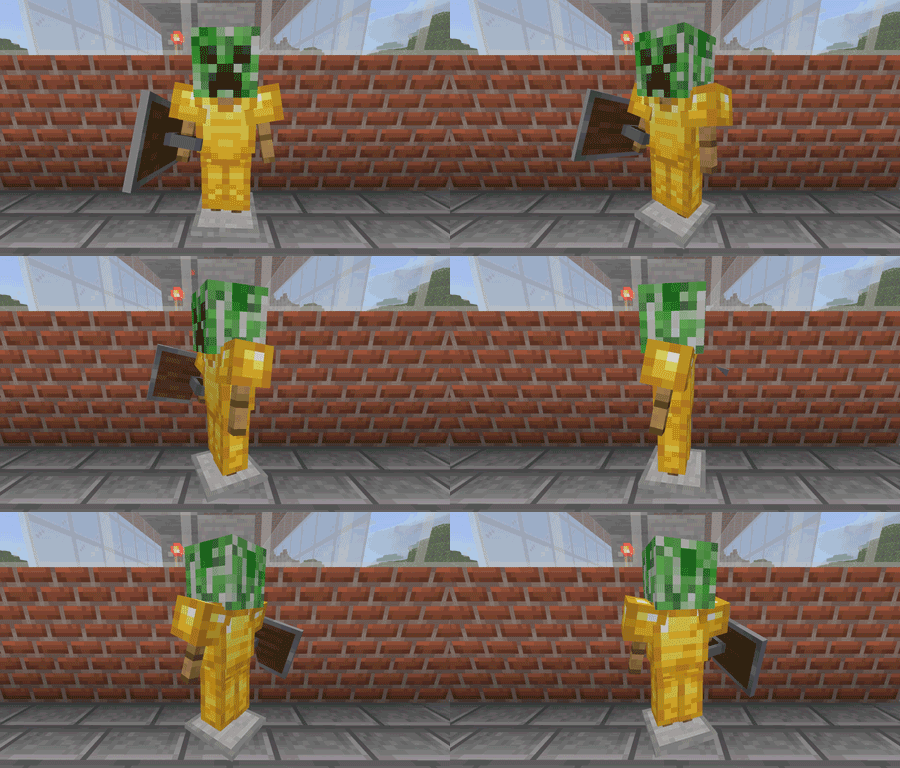
This way, when you stand on the pressure plate
The armor stand will rotate and display itself for you to see~
Duplicating Items


First, dig a pit as shown in the picture
Place the command block and redstone circuitry


Place a stone brick on top of the command block
Then remember the coordinates of the two points in the picture
From left to right, they are
513, 67, 202
511, 67, 202

Open the command block below
In its command input field, enter
clone 513 67 202 513 67 202 511 67 202
Set the block type to Impulse
Set the condition to Unconditional
Set the redstone to Redstone Controlled


Cover it with stone bricks
Then place a pressure plate

When you put the item you want to duplicate in the left chest
Step on the pressure plate
The right chest will duplicate it
You can use this to duplicate
Items that you can’t get directly from the creative mode inventory
Such as a specifically enchanted weapon
This saves you the trouble of re-enchanting
The world of commands is infinitely wonderful
A long string of characters
Can create intricate chain reactions


